Ping Reduction
Section: Free Chat Zone | Started by: Spc | Date: 30/09/2006 19:29


I've tested few QoS options with quake 3 servers.

Intel PRO/1000 MT Server Adapter seems to be the best choice.


Here's picture of this NIC (if you want bigger resolution click on it):
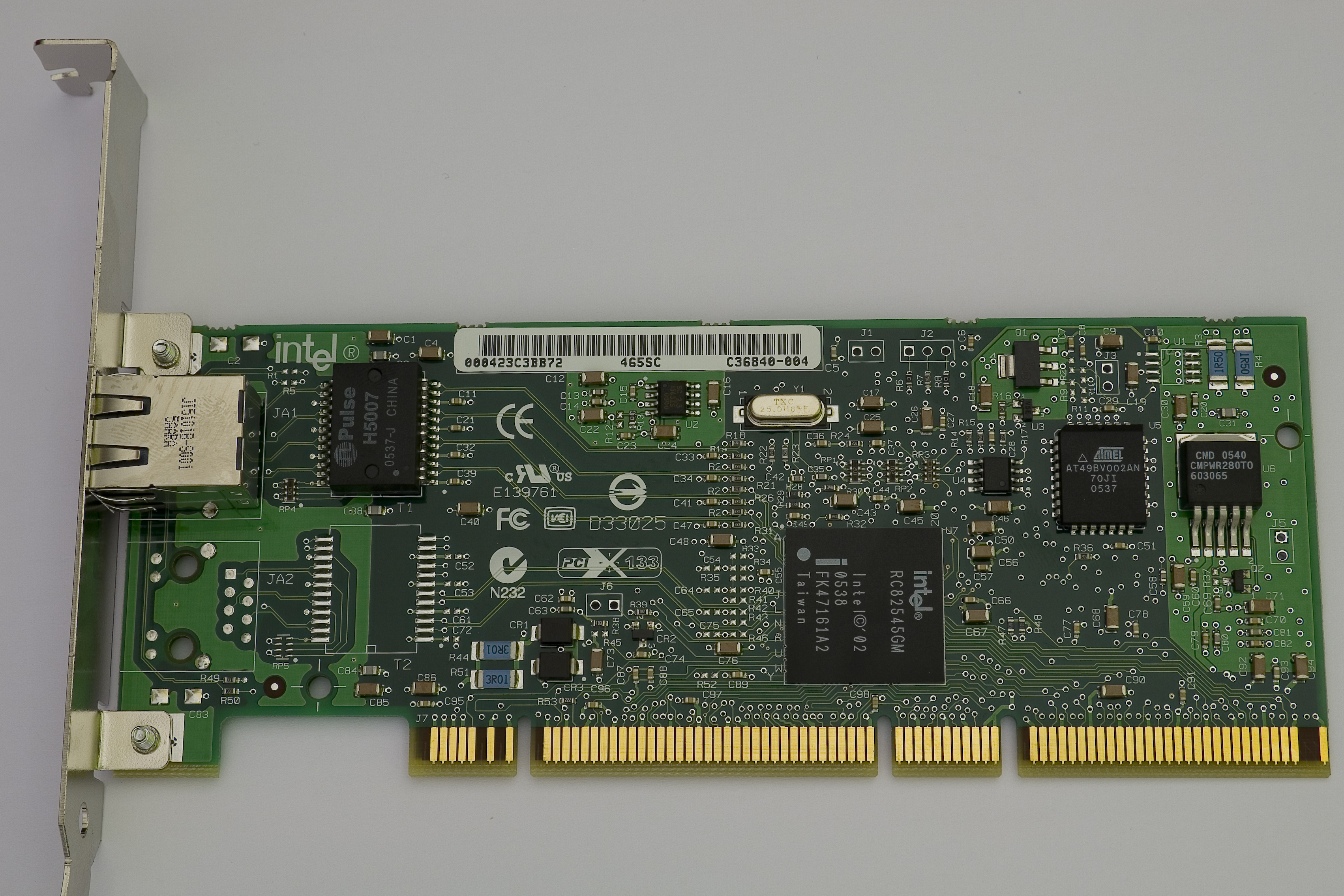


This NIC (Network Interface Card) supports both Layer2 and Layer3 hardware tagging:


You can select special QoS filters for this adapter (weed server for example):
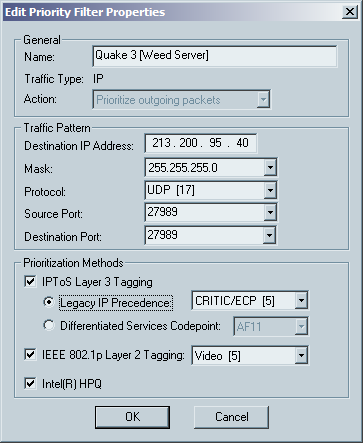
 

*This will tag Quake3 packets to take priority over networks and lower your ping.

  Number 5 is marked as critical/Video priority.


You should also ask your ISP what's the Maximum Transmition Unit (MTU) they support.

Your ISP should support MTU to at least 1504 because for QoS you'll need at least 1504 bytes of MTU.


here are the results (click for larger picture):
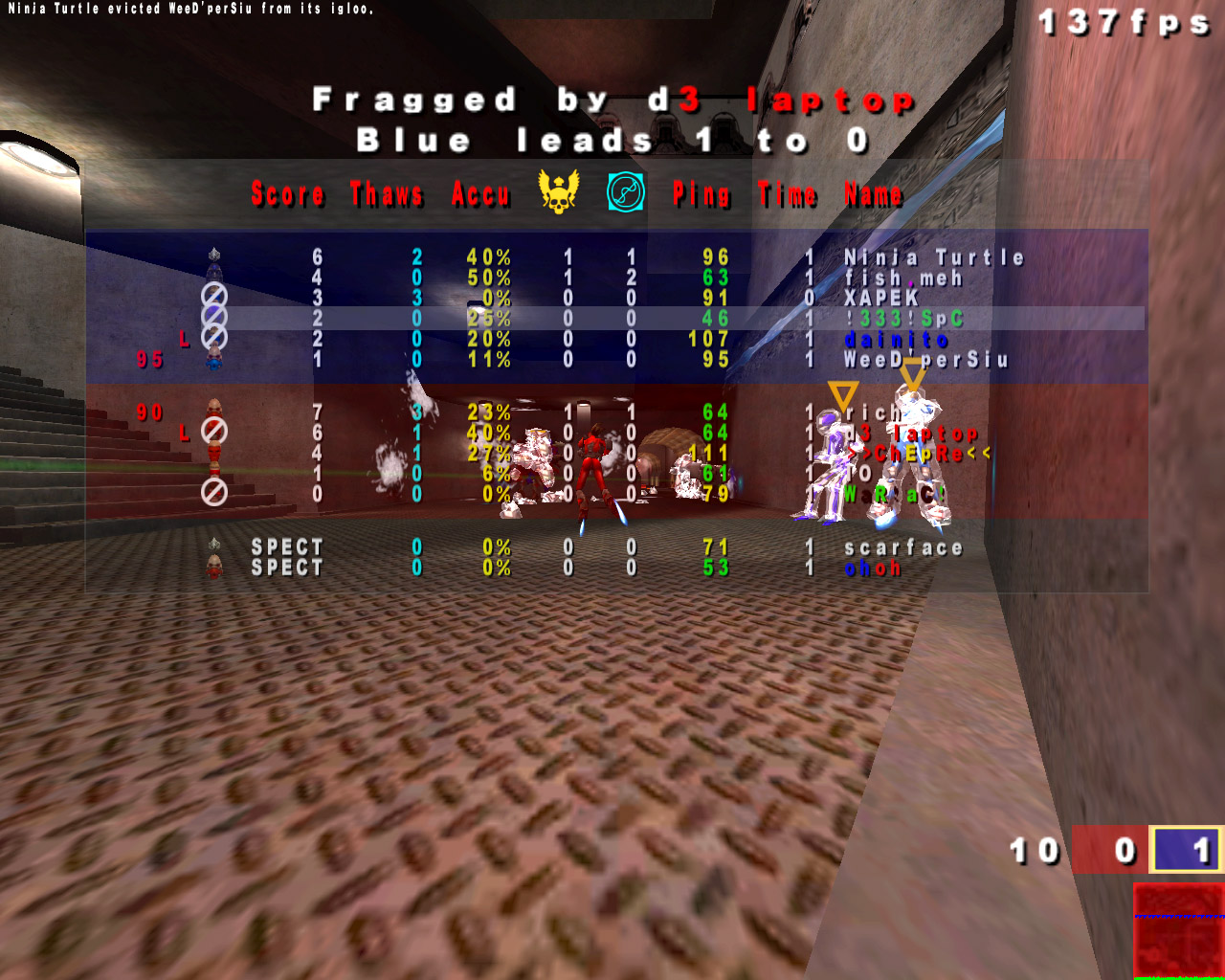

fish.meh is my brother ( !333!NonE )

and you find me under nickname !333!SpC


we're on the same internet line yet we have so much difference in pings this is due because my brother uses normal ethernet packets and

i am using QoS tagged packets everything else in quake 3 is exactly the same .. ( maxpackets, snaps ... )


Difference was and still is approx 20ms whole time of playing.


Intel PRO/1000 MT Server Adapter costs approximately 133 €uros so if you want to lower your ping you should consider buying it.


QoS only works if your ISP and devices (routers, switches  etc...) supports MTU equal to or larger than 1504bytes.


i heard about it, but it will not help my ping ;)


It always helps a bit especially when you're using shared conenctions. QOS makes that some packets, like for example those from q3 have higher priorities than the others. It may not lower your ping, but connection should be more stable.
a mi to i tak nic nie da :p
i understand nothing but i m sure it s interrersting loll
adam*pl Told :
a mi to i tak nic nie da :p

Posted on 30 September 2006 at 22:11:52


Z pewnoscia nie zaszkodzi, ale moze nieco pomoc. Co prawda przypadek tutaj opisany nie jest tani i zalezny od konfiguracji sieci, ale mozna to zrobic programowo przykladowo korzystajac z cFosa czy cFos Speeda, ktory zajmuje sie nadawaniem odpowiednim pakietom odpowiednich priorytetow.

owszem wiem, ale ja mam coś co sie nazywa sieć, ale to jest ja, rodzice, serwero-router wiec wiele mi to nie zmieni :) Kiedyś cfoss probowalem ale to nic nie dawało.
Przy zalozeniu, ze serwero-router dziala na Linuxie czy BSD mozna zrobic QoS bezposrednio za pomoca iptables i tc ;) Jesli smiga na Windowsie to tez da sie zrobic. Jesli jest to standardowy router to calikiem spora ich ilosc rowniez obsluguje QoS, wystarczy tylko ta funkcje wlaczyc ;)

serwero-router to moj kochany linuksik :)


Ale priorytety mi dadzą coś tylko wtedy jak np na drugim kompie ktos bedzie strony przeglądał

You didn't understand me.

These QoS filters are GLOBAL.

This is not for local/shared connections but for GLOBAL internet.

If you enable these your packets will take priority in global scale any everyone else who doesn't have QoS enabled will "lag" behing because in global sense this packets act as packet accelerator .. taking proiroty over all other non- QoS tagged packets.


If only i play quake 3 (witout my brother) with a "clean" internet line (no torrents and stuff) i would still have 64-66ms to weed server because my normal packets don't take priority over other users packets.


Hm sounds cool just thought i'd post to reach 300 posts. =]
Spc Told :

You didn't understand me.

These QoS filters are GLOBAL.

This is not for local/shared connections but for GLOBAL internet.

If you enable these your packets will take priority in global scale any everyone else who doesn't have QoS enabled will "lag" behing because in global sense this packets act as packet accelerator .. taking proiroty over all other non- QoS tagged packets.


If only i play quake 3 (witout my brother) with a "clean" internet line (no torrents and stuff) i would still have 64-66ms to weed server because my normal packets don't take priority over other users packets.


Posted on 01 October 2006 at 01:16:28


aha spc :P


It is like some connections in poland has more priority than others :)


hehe so maybe it will help a bit :)

Yes that's correct shiva.


Most ADSLs go to 1476 MTU and no further.

On the other hand cable modem connections have a standard of 1500 bytes of MTU and if ISP supports it goes way beyond 1500 bytes.

So you need VDSL or Cable connection to get QoS working.


Intel Sever NICs are better than Killer NIC. This is because:


Killer NIC uses Broadcom BCM5461 chipset which has:

1. No Hardware QoS Layer 3 or Hardware Layer 2 support (only SOFTWARE layer 2)

2. Jumbo frames have a maximum size of 9k for one packet only.

3. Lower on die cache (12KB only)

4. No teaming of adapters

5. No server features

6. LLR Technology

7. NIC Requires a cooler for 333MHz processor tu run linux software (software routing on card NPU [doesn't use main CPU]).

8. PCI only


Intel PRO/1000 MT Server Adapter uses Intel 82546 Processor which has:

1. Full HARDWARE QoS support for Layer 3 and Layer 2

2. Jumbo frames have a maximum size of 16k for one packet.

3. High on die cache (128KB)

4. You can team up to 8 adapters and increase speed to 20Gigabits/s (full duplex 40Gigabit/s) [if you have that kind of connection]

5. Server features supported.

6. Interrupt Moderation (for lower ping usually 0.089ms in local network)

7. Hardware routing on nic's chipset [doesn't use main CPU], doesn't get hot (no cooler)

8. PCI and PCI-X


Both cards have full TCP/UDP/IP offloading.


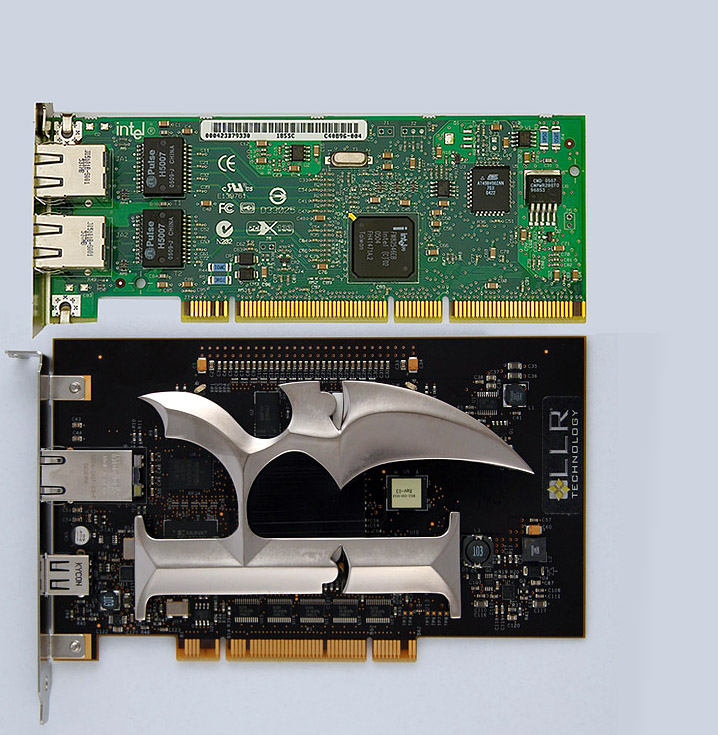
Intel PRO/1000 MT Dual Port Server Adapter

Killer NIC


White papers:

Interrupt moderation

LLR Technology


Comparison:


It's offtop - but Spc!!!! We need help in gettting the sources for the mod!!!


i see the card at the bottom comes with a ninja weapon

yeah jezuz was about to reply with the same comment maid, lethal secret stash :o
I bet that s the better one.
here are the results (click for larger picture):


fish.meh is my brother ( !333!NonE )

and you find me under nickname !333!SpC


and i was playing on laptop (from workplace) haha! 32Mb ram(dac) ;P lol. But yes! it works! youre ping seems much better ffs

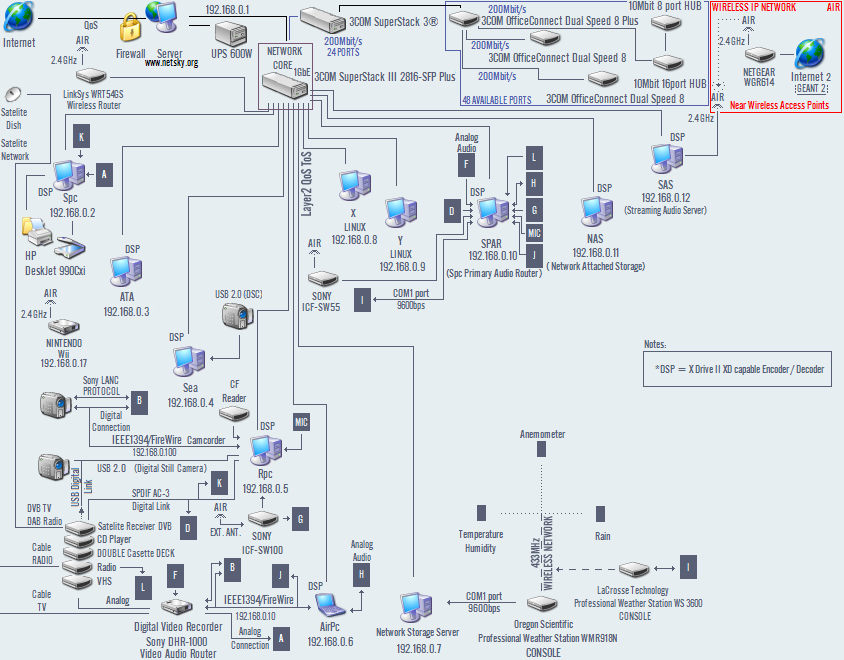
I had the lowest ping when i enabled Layer2 QoS and CoS on my network card. As you all may know me and my brother share the same ip / internet connection so here you see a hudge reduction in latency (ping).

My Current local network:


wow :)


how geeky!


Anyway, spc, tell me please how you made this sweet figure of your network and please do not say you did it with paint cos i won't believe you.
Paint can only used for simple things, such as Da Vinci's mona lisa (<-- link here).


HAHA.
Yes i used pbrush.exe


If anyone wants these MT server adapters they have it here:


http://search.ebay.com/MT-Server_W0QQ_trksidZm37QQfromZR40


Dual port is the best since it features 128KB packet buffer (same as quad port), single port has only 64KB which is very much by today standards.


Intel PRO/1000 MT Server Adapters are 1gbit high performance especially designed for windows server 2003 that lower ping for about 60% in comparison to ordinary network adapters.


If anyone should buy it then i'll send you special modded drivers for quake3 so you can lower your ping.


And just for your information this card is 100x better than killer NIC http://www.killernic.com/ and 10x times cheaper.

I've found your post really interesting. It's so sad that my fucking provider is fragmenting my packets over 1460. I have to admitt, that you had a nice idea : using QoS to fuck providers packets priority. I will remember it for later. Nice, spc.

Svarog Told :

I've found your post really interesting. It's so sad that my fucking provider is fragmenting my packets over 1460. I have to admitt, that you had a nice idea : using QoS to fuck providers packets priority. I will remember it for later. Nice, spc.

Posted on 02 December 2007 at 14:06:11


Yeah .. mine goes up to 1504 without any problems (i am guessing my isp doesn't know wha MTU or QoS is).


k now, my provider told me some shit that our cables are dusty and dirty or that we have too many cables between splitter and modem! and some other unlikely shit. we've tested the ping and it was a huge difference between wlan and plugged in connection. BUT we went to Bedzie with 3 different computers: wlan laptop, my new pc, my old pc (both plugged in) and on all 3 computers we had the same ping: 60-70. This rules out any wrong settings or cable problems in our appartment, doesnt it? anyway, I think the vdsl2+/adsl difference is most likely to be the problem. I had very good pings up to the middle of the year (checked saved screenshots) hm, either we "downgrade" to less bandwith or/and change provider... any other possibilities? spc I know your post and thx for the help, but i wanted to try to reduce ping without spending much money, cause i had good ping before!


Now we can strike out the "It's Andis cable" or "It's Andis Connection from his home to his provider" possibilities, here is the standart procedure to correct your ping problems:


1°) Traceroute the server.


2°) Find where it itches and nuke the place (the american way).


=> Thereby, there should not be any computer left around.
     Thereby, your provider will need to change the route.


3°) Check if your ping has changed.


=> If it didn't get better, go to step 1
     If it did, go to step 4


4°) Write a check to Greenpeace and sign Kyoto's protocol - We, Europeans, have the ecological moral upper hand and we don't wanna give it up to no god darn yankee.


:D