As u know we've tried lot's of freeze mod's in past and now there's mostly an
osp based freeze mod on servers (of course because servers are not pure u don't
need it to play in it) .. Lot's of ppl dislike it, that's why i'll give just a
small amount of advantages u can get/set with it ..
Advantages of OSP based freeze:
- AS ALL OF U MAYBE KNOW, U'RE ABLE TO SET
ENEMY TEAM PLAYERS IN A COLOR U WANT
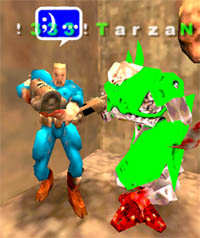 |
As u can see here, i have them in
bright green .. they're all so easily
spotted, ur eye catch them even if u're in a fight with others and
someone is running little bit downstairs or somewhere .. of course u can
have them in any color, if u want to have them in white, go on, if u
want them to have white legs and red middle body, go on (still some
christmas spirit in me ;-D), etc .. indeed a advantage!
settings:
/cg_enemycolors "iiii"
/cg_forcecolors "1"
u can use letters or numbers for setting
enemy colors .. iiii is for: green rail, green head, green body, green
legs .. if i set it, for example, on 2471, all enemies will have: 2 -
green rail, 4 - blue head, 7 - white body, 1 - red legs .. it's also
good when someone shoot from behind and if i see green rail, i know it's
an enemy, otherwise my team mate ..
|
|
stema is the big fat ugly green tank jr :-) |
|
- U ARE ABLE TO CHANGE ENEMY PLAYERS TO A SKIN
U LIKE
as u can see on the picture above, whole enemy
team have the tank jr.'s. What's here different from normal mod is, that u can
only set enemy team to have such skin (u can set for ur team too, also in a
normal freeze, if you want to change enemy skins, they'll have the same skins as
u have, including with ur team, so all players will have ur skin)
Why this is an advantage? Simple, tank jr. for
example, have his loud walk and thaw like effect for jumping .. if someone is
behind me and he jumps i'll hear it for sure and safe my back, so is if he'll
jump on those "jumpers" or he'll just walk behind me, i'll hear him asap, so i
will asap avoid the back shot's from enemies .. another thing, because his walk
is so loud, i can so easily hear when he'll come from places u don't see .. so
if i'm for exmpale on rocket luncher area on q3dm6 (upper middle), i'll in
seconds know some enemy will come from either left or right side, even thou i
don't even look back or check the passages .. so powerfull, it's like a walk
hack! And when he jumps on those "jumpers" u hear it even if u're on mount everest ;-)
settings:
/cg_enemymodel "TankJr/pm"
if u add /pm at the end, osp colors will be
enabled, so 2222 and iiii is little different in brightness .. anyway, some ppl
have problems with it, if they don't add /pm at the end, so u have nothing to
lose if u add it .. anyone, a good skin besides tankjr is also keel
(cg_enemymodel keel/pm) .. loud walking/jumping ..
also if u want to change ur team members to
only one skin (our skin), u can do that with the following: /cg_forcemodel "1"
- UR TEAM MATES CAN ALSO BE IN DIFFERENT COLORS
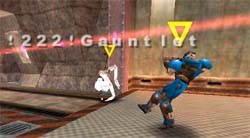 |
Why this can be good? As u know we
have leaders/co-leaders in teams .. and some players, like rebtor for
example (i bet 50% of others have it too), have set that all his team
mates have the same skin as he's .. as u can see i don't have that,
because of some leader and other issues .. so if leaders/co-leaders are
in different colors it's so easy to spot him, evenif he's hiding in some
dark corners or anywhere .. of course enemies don't see them in
different colors! They see them in a color they have set it up, if
they're using osp, otherwise they have them in default plain blue or red
.. this is powerfull when grouping, leading, .. |
|
as u can see only the
team mate with orb skin is in white color |
|
if u want to install it or u're just interested
in more stuff about it, u can find everything on our forums:
../../forum/thread_3144.html
Disadvantages of OSP based freeze:
Grapple is little bit different, but when u get
used to it, it's like a charm .. scoreboard (and some other things) are little
bit "expanded" so u may not like them, voice says doesn't work (vsay)
Normal Freeze Mod "Add-ons":
If u still don't like osp and it's advantages,
u can still tweak ur normal mod a little bit ..
- CHANGING ALL DEFAULT SKINS TO BRIGTHER:
here u have a .pk3 file in which all skins are set to such brigthness u'll able
to see them better .. (can't find it, atm:D)
- CHANGING SKINS TO WHITE COLOR:
also here is another .pk3 which will get u the white teams
decide which one u'll use it, if u'll any..
- FORCE ALL MODELS TO BE AS U
as said little bit above, /cg_forcemodel "1" will do that for u .. if u see an
advantage in it, then use it ..
SETTINGS:
- ON CLANWAR
these are recommended:
/cg_teamChatsOnly "1"
If u only want to see what ur team is writing, set this .. use this when we're
in a clanwar .. we'll be talking a lot there, so be sure u won't get confused by
other messages or something .. if u want to focus on game, do that! After u
finish of course set it back to 0, so u'll see what others are saying ..
/cg_teamChatTime "7000"
this is the duration of time for team_say to be displayed on screen .. 1000
stands for one whole second, so 7000 is for 7 sec and default is 3000, which is 3
seconds .. set it as u want and btw 3000 is way too less on clanwars!
/cg_teamChatHeight "8"
this will bring u another window at the bottow of the screen in which only
team_say's will be written .. this is good, cos u don't have to look up and u
really see the text as soon as possible .. this is an important options, so use
it! (default is set to "0")
- CONNECTION LAG (PING):
best settings for pings from 0-60 (dsl, cable):
/cl_maxpackets "100"
well, u set here the maximum packets to be sent to server.. of course u'll have
a lower ping if u'll set them to lower, because less infromation will be sent to
it ..
have it set on 60+, because u'll really be able to shot smoother and ur rail
won't lag or something, so won't ur moving.
/rate "25000"
with rate u set how many bandwidth (internet speed) u'll use for downstream ..
how many bytes per second will server send to u .. 25000 stands for 25kb/sec, so
25 kb of ur internet speed will be used for quake .. the less u set, the higher
ur ping will be ..
/snaps "40"
snaps is used to calculate how many updates u'll get from server .. 40 is the
best option, just set it! :-)
- GRAPHIC LAG:
well what's a graphic lag overall? if u set fps to 10 u can see what i mean here
.. also other players will see u lagging like as u have a maxpackets to 15 or it
will be even worse .. because lot's of u play on highest details available in
the game, ur fps jumps around. This is very bad when, for example, ur fps jumps
from 80 to 30 or 125 to 80 .. if jumps are common, it's even worser than a bad
ping .. the best thing to do here is to have a "stable fps" .. so to set one,
let's first check what's ur fps in field .. type /cg_drawfps "1" in ur
console, that will display u a number of fps's on the above right corner on
screen .. try to get an avrage from it and set it with /com_maxfps .. for
example, if my ping jumps from 125 - 80, i'll set max fps to 100: /com_maxfps
"100" .. there are of courser several ways to increase ur fps, well i won't
go into details here, some of important one u can already set in the settings ..
/cl_timenudge " "
this let u set a ping u want to have it .. it's mostly used for single player,
where a cl_timenudge "60" will give u a ping of 60, so if i want to train with
bots on ping 50, i'll set timenudge to "50" and have a ping like on online
servers.. but the effect is little different if it's used with negative values
(cos ping is only an positive integer) .. negative values are used to client
side prediction .. what i'm saying is, with negative timenudge u'll be able to
avoid players with packet loss, low rate or low maxpackets, from their lag
moving .. it's best to pick a value somewhere of 25% (maybe little more) of ur
normal ping, so with ping 50 this is -12.5 ;-) u'll get lot's of yellow stripes
(in lagometer) when put it on less .. this can effect ur ping a little .. u can
gain/lost here some of it .. (also u can try with an negative value, which is
50% of ur ping .. prediction will be better, but ping will be worser)
/cg_smoothclients " "
if u set this to 1, be sure ur timenudge is set to 0!! This is better client
side prediction and u'll will mostly avoid all laggers .. but small prediction
errors can appear .. u get best results here for low maxpacketers ..
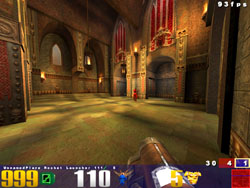
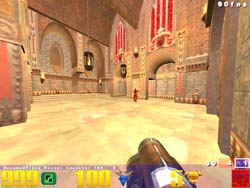
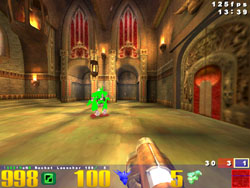
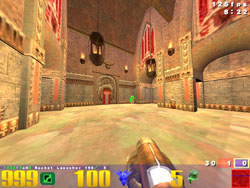
- WHY HIGH FPS AND LOW GFX DETAILS?
with high stable fps ur game is smoother and so will be ur aim, it's easier to
move, turn around fast, etc etc .. when u have low details in quake, it's easier
for u to see enemies and other everything, there are no lightening effects, no
dark corners, so no one can hide in it or so .. also u get higher fps's with low
details .. check the pictures below and make up ur own mind about it:
|
|
|
|
|
|
the visibility is really
low, and he's not even in the darkest place in the room .. also notice
that blue players are even worser to look at .. |
it's better on lower
details, there are no shadows and lightenings, so if he/she's camping on
the roof, it will be no problem to spot him/her |
as u can see with green
enemies, thier visibility is very good even in high details .. |
also enemies are nicely
seen when they're far away, no chance to overlook him for sure .. |
notice that details are different on left and
right side, cos i was in different quakes .. the pictures with osp style (right
one) are the one from my config, so there're higher fps's ... if u're interested
in my config, or want to base urs on mine, here it is
- SOME RAIL "TWEAKS":
/cg_railtrailtime " "
this will set the time for rail how long it should be visible, before it
disapear .. 1000 stands for 1 second, default is 400 .. this is good to spot
like campers or enemies, before u enter a room ..
/r_railCoreWidth " "
this one will set the thickness of rail .. if u set it to 1, it will be very
thin, 6 is an default option ..
[ BACK ]